Shift notes for group homes
Tap what happened.
The note writes itself.
A signed note in under a minute, not half an hour. Your staff tap what happened, the draft writes itself, and they sign on their phone. It prints on your letterhead. Once signed, nobody can change it — including us.
$100 a monthflat — any number of beds, any number of staff
Opens a sandbox with three fictional residents. Nothing in it is real and it asks you for nothing — or set up a workspace.
See what the day still owes
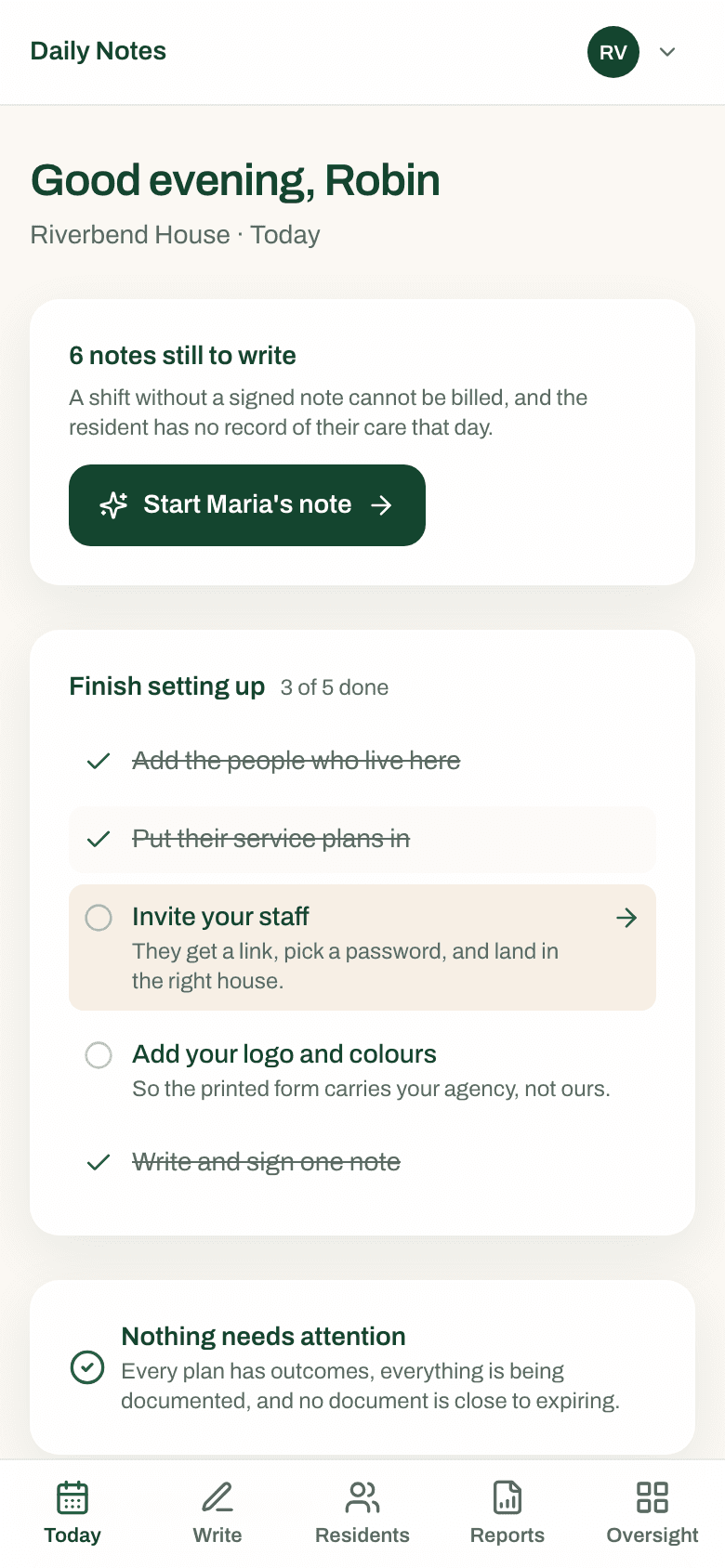
It opens on how many notes are still unwritten, and why that matters. One tap starts the right one.
01
See what the day still owes
It opens on how many notes are still unwritten, and why that matters. One tap starts the right one.
02
Tap what happened
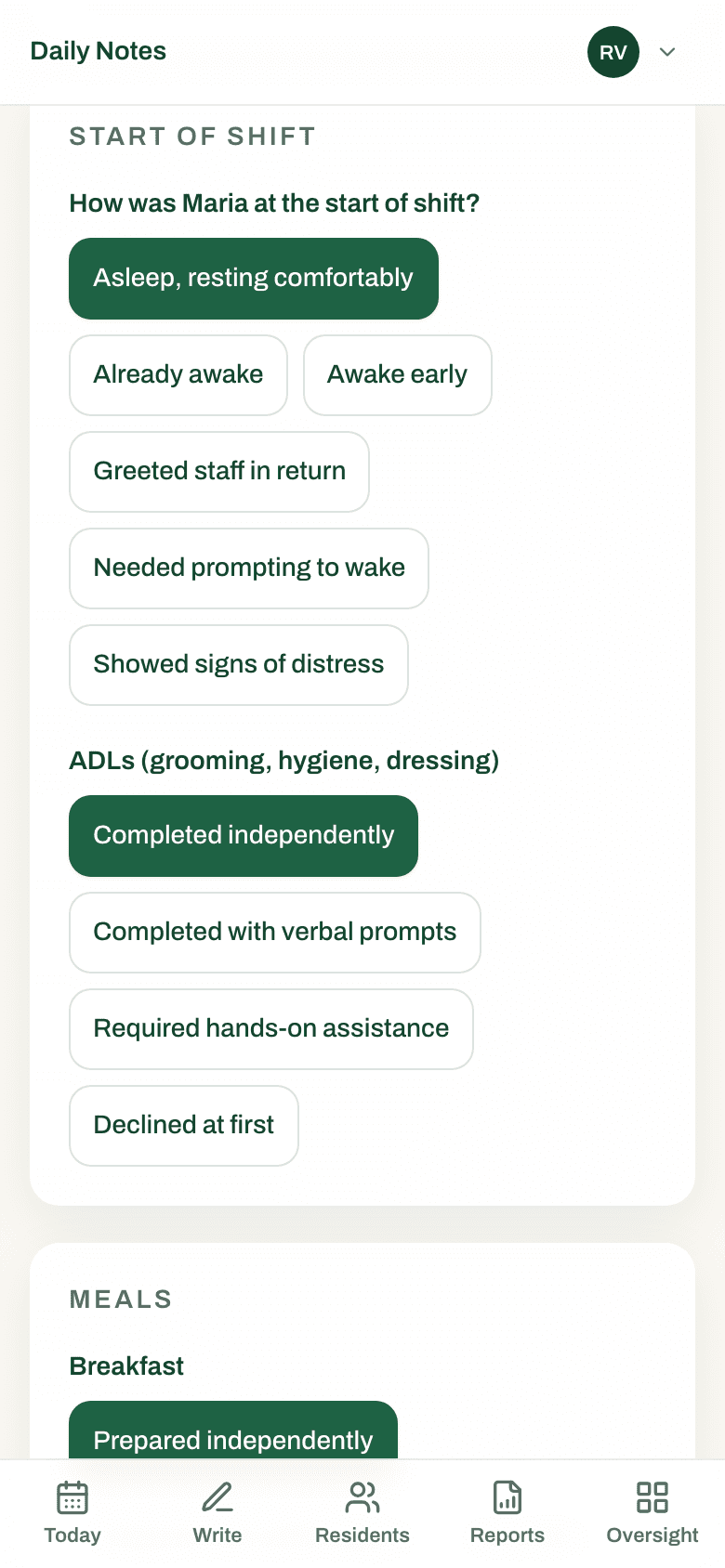
The chips are the form — meals, sleep, personal care, mood, incidents, and the resident’s own service-plan goals.
03
The draft writes itself
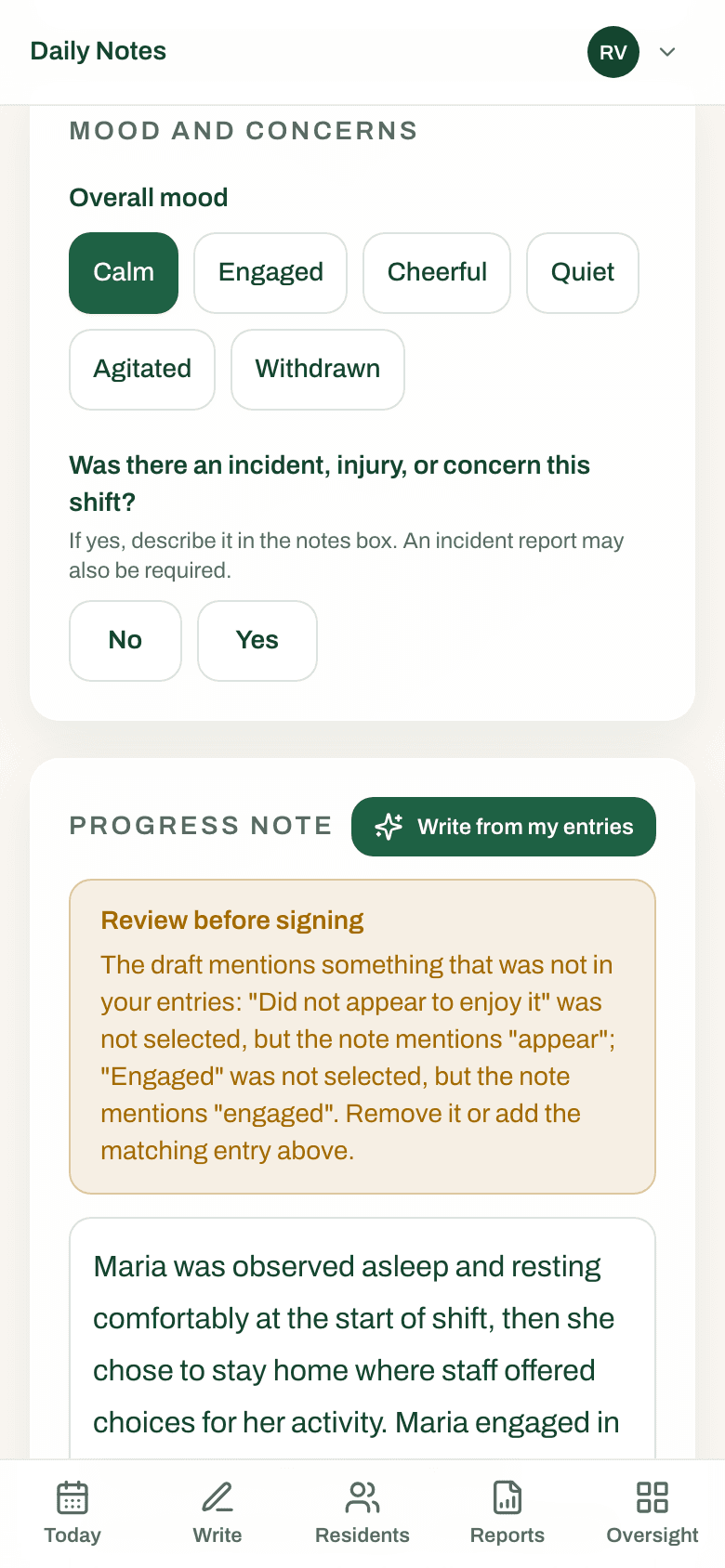
One tap turns the taps into a paragraph, then checks the paragraph back against what was actually recorded.
04
Sign on the glass
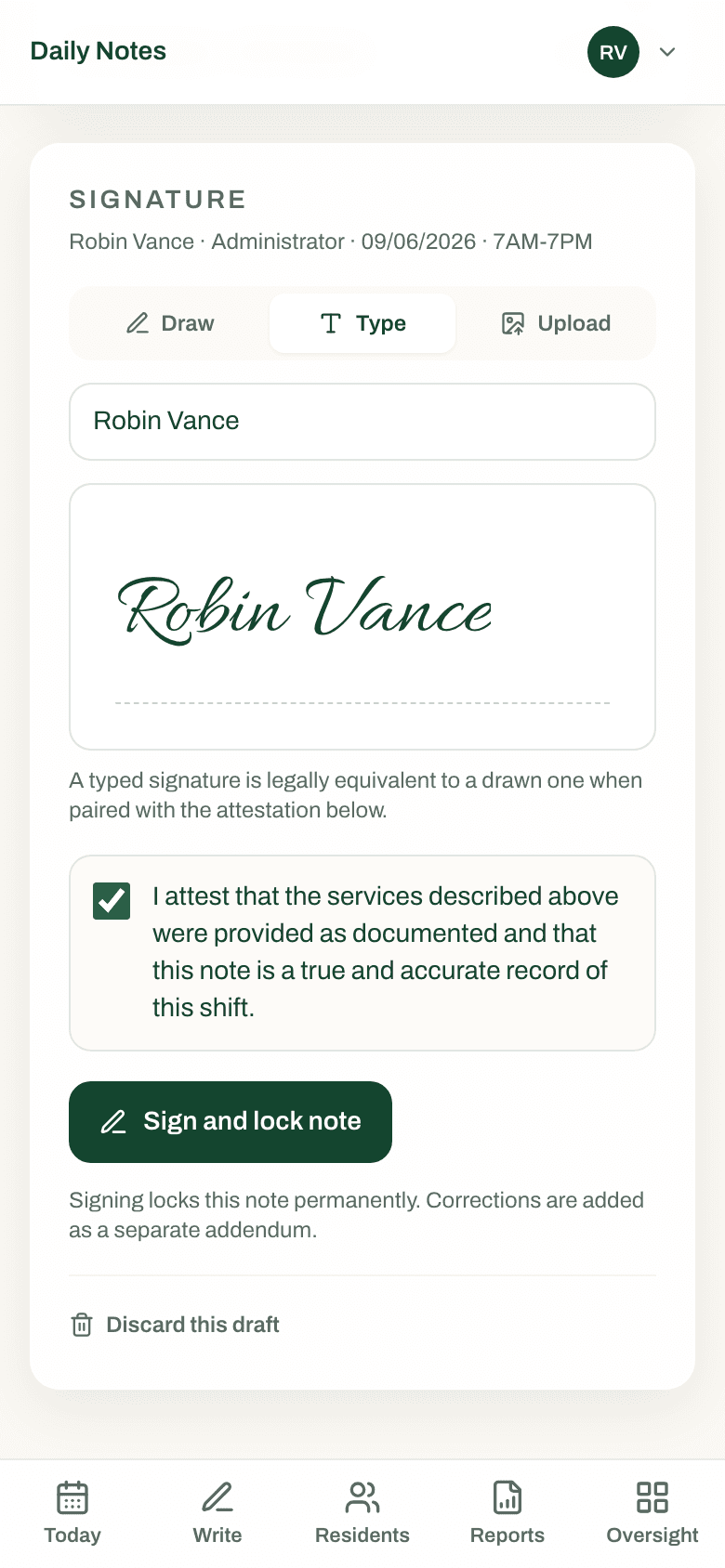
A finger on the screen, or a typed name. Signing locks the note in the database — nobody can edit it afterwards.
05
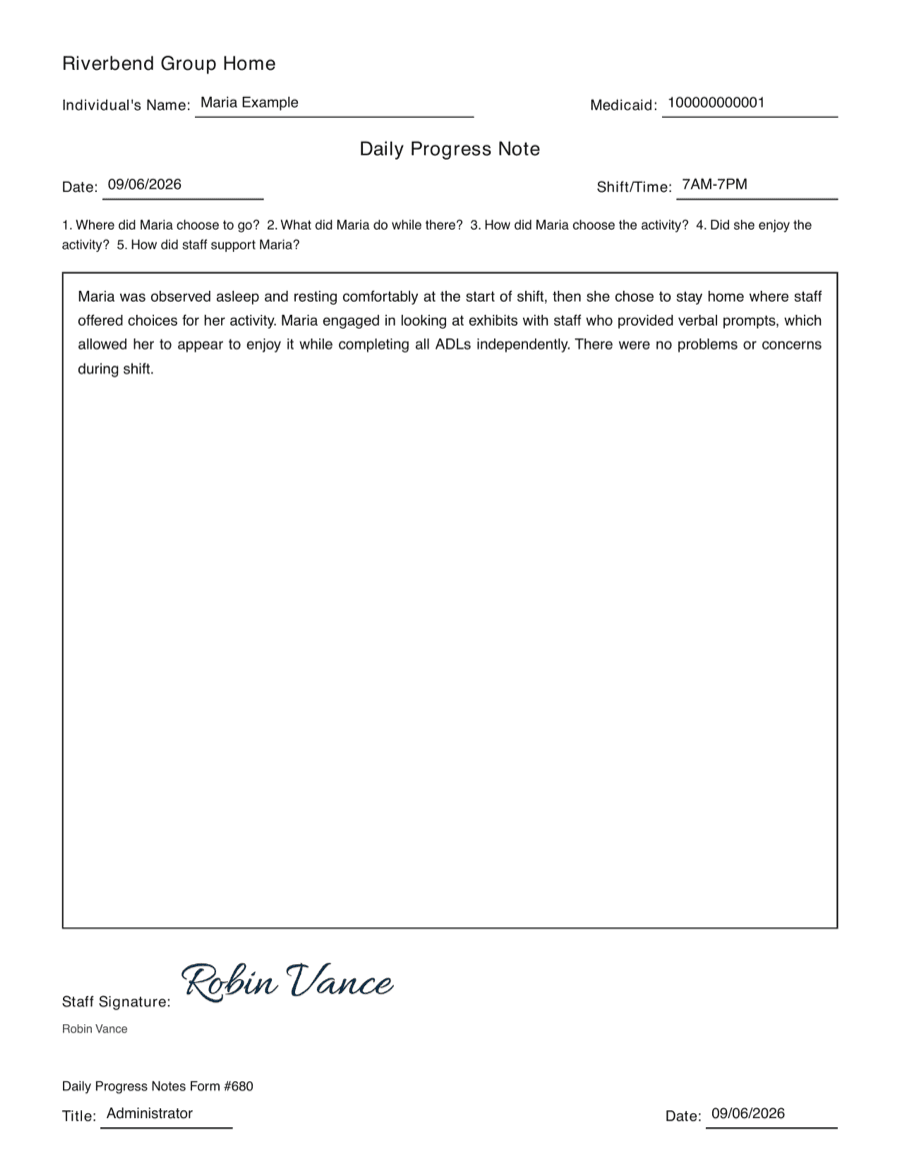
It prints on your letterhead
Your legal name, your logo, your address — ready for the binder or the licensing specialist.
- $100
- a month, flat
- Any
- number of beds
- $0
- to get set up
- 50
- states, plus DC
01
The shift
What the screenshots do not show.
You have just watched the whole product. There is no implementation phase, no configuration project and no week of training, because there is not enough here to need one — so this is the part that does not photograph.
Watch it happen
Four short films, each answering a different question.
Will my staff actually use it?
A shift note, start to finish
Can staff write on our own form?
Any form, rebuilt for your staff
Do I have to retype everyone?
Set up in three steps
Will it look like my agency?
Your letterhead, your colors
One note, start to signed
Drawn to scale. It is a tap count on the demo, not a stopwatch held over your staff.
Read exactly what we counted- 01
The chips are the form
The same wording that is on the paper, and questions that carry the resident’s own name and pronouns — so nobody is reading “the individual” at the end of a twelve-hour shift.
Their service-plan goals sit in the same list. Documenting the plan is not a second job.
- 02
The draft is checked before you see it
It writes from what was recorded and nothing else. An invented clock time, a quoted sentence, or a topic nobody touched is flagged to the DSP before they can sign.
The first 10 drafts are free. Writing notes by hand never costs anything.
- 03
Signing locks it in the database
Not in the app. No route, no script and no console session can edit a signed note afterwards, including ours.
A correction goes on as a dated addendum, the way a paper chart works.
- 04
The letterhead is yours
Legal name, logo, address and footer, pulled from your settings as the document renders. For a review, export a whole date range as one merged PDF and print it in a single pass.
Quarterly progress against each resident’s plan builds itself from the notes already signed.
02
Under review
What an auditor sees.
The reason to move off the binder is not that typing is nicer. It is that a binder cannot prove when a note was written, who opened it, or that nobody went back and improved it afterwards.
A signed note cannot be changed
Not by a supervisor, not by a support engineer, not by somebody with the database password. The refusal is a trigger inside Postgres, and it fires for every role. Addenda are append-only for the same reason.
Every read is on the record
Opening a note, rendering a PDF, running an export — each is written to an audit log with who, when, and the address it came from. That log can be added to and nothing else: no edit, no delete, enforced the same way.
Your letterhead, not ours
Legal name, address, logo and footer line are yours and are read per agency when the form is rendered. There is no default logo, because the only honest default for an agency that has not uploaded one is nothing at all.
Records stay inside your agency
Residents, notes and plans are visible only to the staff you invite, enforced by row-level security in the database rather than by what the screen chooses to show. Signatures and uploaded plans sit in private storage. Medicaid IDs are encrypted at rest.
What we are not claiming
FlipBrief is not HIPAA certified — there is no such certificate, whatever a competitor’s badge implies — and we have not signed a business associate agreement with you or with the model vendor behind the drafting assistant. If a signed BAA is a condition of your contract or your insurer, it is a real blocker today and you should have it in writing from us before a resident’s name goes anywhere near this. We would rather lose the sale than let you assume otherwise and find out during a review.
03
The price
One hundred dollars a month. That is the price.
Not per bed, not per user, not per note. The systems built for two-hundred-bed operators want an implementation fee before you can write your first note; a six-bed house should not be paying for a sales engineer’s calendar.
$100/ month
- Every resident, every staff member, every house you run. There is no per-bed line.
- No setup fee, no implementation, no training package, no annual commitment.
- The first 10 assistant drafts are free, before you have decided anything.
- Writing, signing, printing and exporting notes never require a subscription — a lapsed card stops the assistant, not your records.
Who this is for
A four-to-twenty bed group home or behavioral care agency, where the person choosing the software is also the person who will be sitting across from the licensing specialist. If you have an IT department, you are not who this was built for and it will feel too small to you.
04
The gaps
What FlipBrief does not do.
Put where you can find it, rather than three emails into a trial. Every one of these is a real reason somebody would not buy this, and you should know them all before you spend a hundred dollars.
- No eMAR.
- Medication administration stays wherever you keep it today. If your staff open Therap every shift for the MAR, they will still open it.
- No incident reporting yet.
- The note asks whether there was an incident and records the answer. Filing the report with your state is still yours to do.
- Only one state’s form is built.
- West Virginia requires documentation on a Direct-Support Service Log (WV-BMS-IDD-7) and we reproduce it. Texas publishes Form 4119 for residential support and we do not — a Texas note cites the Texas rule instead. Those two are the only states of the fifty-one that publish a form at all; everywhere else a state publishes a rule about what a note must contain and leaves the layout to you. Where we have read that rule we cite it at the foot of the page, and where we have not, the note is complete and defensible but claims nothing about your regulations. We used to say Virginia issued “Form #680” and printed that on every Virginia note. There is no such form — 680 is a section of 12VAC35-105, the regulation that requires progress notes at all. We had read a citation as a form number, and an invented one is the thing that actually hurts you in an audit. There is a page listing every state and exactly which of the three yours is.
- No scheduling, no time clock, no family portal.
- Small agencies do not buy those from the same place they buy documentation, and we would build them badly.
- And no customers yet.
- FlipBrief has not been sold to anyone. You would be the first. There is no logo wall on this page because there is nothing honest to put on it.
05
Asked and answered
The questions that decide it.
Answered the way we would answer them on the phone.
How much work is one note, really?
Somebody counted, on a phone, on the demo anyone can open: one resident, one shift, two service-plan goals, from the roster to a signed note. Twenty-seven taps, twenty-eight if you open the PDF. Two service-plan goals account for ten of those taps — a shift with no plan work in it is closer to seventeen. None of them is typing. Then we timed it rather than guessing: three runs on the live site, one tap per second, from the roster to signed and locked. A note with one goal worked came to nineteen taps and thirty-one, thirty-three and forty-six seconds. Ten to twenty-four of those seconds were the draft being written — the slow one is the first note after a quiet spell — and a real person taps faster than once a second. The half hour we quote is not ours and we have not timed it: it is what a provider running homes today told us their own notes take. Treat that as one person telling you about their week rather than as a study — we looked for a study and there is not one, and the per-note figures quoted elsewhere in this market are usually invented. Your first week will be slower while people learn where things are, and a shift with an incident in it will always take longer, because it should. Count it yourself on the demo; if we are wrong we would rather you found out before you paid.
Does resident information go to an AI company?
On the hosted version, yes — and we are not going to phrase that away. Before a draft is requested the resident’s name is replaced with an initial, and long identification numbers, dates, phone numbers and email addresses are stripped out. If the resident’s name or Medicaid ID survives that pass, the request is refused instead of sent. That is real risk reduction and it is not de-identification, and we will not call it de-identification. A self-hosted install can point the assistant at a model running on a machine in your own building, in which case nothing leaves it. Ask which one you would be on before you decide.
Are you HIPAA certified? Will you sign a BAA?
No, and not yet. There is no HIPAA certification to hold — nobody issues one — and we have not signed a business associate agreement with you or with the model vendor. If a signed BAA is a condition of your contract or your insurer, that is a real blocker and you should hear it now rather than after you have typed a resident’s name in.
What if the assistant writes something that did not happen?
You catch it, and the product is built on the assumption that you will. The draft appears as editable text above the signature, never as a finished document. It is checked against the taps it came from, and anything it asserts that was not recorded is shown to the DSP as a warning before the note can be signed. Nothing is filed until a person reads it and signs their name to it.
Do we need computers?
No. It is built for the phone in a DSP’s pocket first and looks the way it should there. On an iPhone it installs from Safari with Add to Home Screen; on Android there is an app file on the download page that staff can install without an account. A note being written is saved on the device as it is typed and syncs when the signal comes back, so a basement laundry room does not lose a shift.
What happens if we stop paying?
Writing, signing, printing and exporting notes never require a subscription — that is true for a lapsed card as much as for a cancellation. What stops is the assistant. Your records stay readable and printable, because a documentation system that holds a Medicaid record hostage is not a documentation system.
Can we get our records out?
Pick a date range and a resident, or the whole house, and you get one merged PDF with every signed note in order. Per resident there is also a quarterly report built from the notes already signed. Both come out as documents, not as an export format only we can read.
Write one note and see.
The demo takes a few seconds to build, asks for nothing, and puts you on a roster with three fictional residents. Write a shift note, sign it, and open the PDF.